
Pinterest Examples
Graphs & Charts
Graphs and charts can be very helpful in conveying information, but they can also be very dull. As a visual communicator your job is to be creative and dress it up. Think about your data and what you are trying to display. How could you make the graph/chart look more relevant and interesting? Do you have data about the number of tweets per second? Why not dress up the graph to look like an odometer? The image that follows demonstrates how a little creativity can make your design more visually appealing. This will get more people to stop and internalize your message. Using a plain graph/chart is not only boring, but it also might cut you out of a job. Anyone can make a graph/chart by using widely accessible and free tools. Few will pay you, or at least pay you well, for what they can do themselves.
Click on the image to read The Do’s and Don’ts of Infographic Design
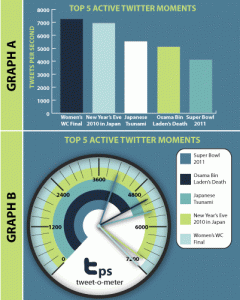
The Do’s And Don’ts Of Infographic Design by smashingmagazine.com
Appropriate Design
It is important to have creative and good looking graphs and charts. It is also important to have your stylized graph/chart fit in with the rest of your infographic. Don’t just follow a tutorial that makes your graph look 3d. This might be cool looking but it might not fit your design. Put some thought into how you can tie everything together.
Accuracy
You want to make sure that your graphs/charts are to scale. There is no reason that you can’t achieve this. Illustrator, and other tools, make it easy to create simple graphs/charts. After creating the basic chart you can then ungroup it and manipulate it. Here is a tutorial that shows you how you can manipulate a simple bar graph http://vector.tutsplus.com/tutorials/designing/turn-a-boring-bar-graph-into-a-3d-masterpiece/. Please remember to not make a graph/chart 3d because it just looks cool. This tutorial is to give you an understanding about how you can manipulate a graph/chart in Illustrator.
Also be sure to not mislead your audience. Graphs and charts that sit next to each other with different scales and skewed perspectives can distort the data and the perception of your viewer. This is dishonest and should be avoided.
Submission
This activity can be included in any of your updates, but this activity must be included also in your final project blog post.
Recent Comments